Joined: Oct 13, 2007 Posts: 6221 Location: near Austin, Tx, USA
Audio files: 270
Posted: Wed Mar 12, 2008 1:22 am Post subject:
Building a Modular Synth in ChucK Subject description: Is it possible?
I am so new to music creation (just five months into the hobby) that I have enjoyed reading the different forums here with wide-eyed interest. I just learned about these Modular Synths, and I thought that would be a great thing to implement in ChucK. After all, the pieces are there. What we don't have is a connection matrix.
I have been trying to think of a way to ChucK up Ugens dynamically from a MAUI interface, but have yet to discover the way. Does anyone have any ideas? One thought was to put a slider at each output and each input, then let there be say 20 integer settings on the slider. If you slide to a certain value, you unChucK from where you were and ChucK to your new connection. Any thoughts on this?
Or make a connection matrix buttons/knobs.
if the button is pushed, the chucking would be toggled (on/off)
the knobs (sliders) change the amount sent. (set .gain)
the matrix might have some basic stuffs: oscillators, filters, multiplier or something..
but I just don't know how to design that effectively in MAUI
i haven't played with them before.. i've only tried the examples in Mac a few times.
Joined: Oct 13, 2007 Posts: 6221 Location: near Austin, Tx, USA
Audio files: 270
Posted: Thu Mar 13, 2008 3:44 am Post subject:
I'm going to say it's possible but impractical. I can think of some ways that you could do it if you had to, but then why not use ChucK itself, why the extra layer of software? It was just a thought.
Joined: Apr 18, 2007 Posts: 29 Location: Boulder, Co
Posted: Fri Mar 14, 2008 10:00 am Post subject:
=> is a code based patch cable.
Modular synthesis is already directly ingrained into ChucK. With a modular synthesizer you pass a sine wave generator to and LFO to the output. This is the same way I think when designing a ChucK program.
Joined: Oct 13, 2007 Posts: 6221 Location: near Austin, Tx, USA
Audio files: 270
Posted: Fri Mar 14, 2008 11:18 am Post subject:
renderful wrote:
=> is a code based patch cable.
Modular synthesis is already directly ingrained into ChucK. With a modular synthesizer you pass a sine wave generator to and LFO to the output. This is the same way I think when designing a ChucK program.
Good point. And why make a GUI for it when others have done that so well? It was a bad idea, oh well.
Joined: Oct 13, 2007 Posts: 6221 Location: near Austin, Tx, USA
Audio files: 270
Posted: Fri Mar 14, 2008 12:30 pm Post subject:
Well, i was thinking of a way to do something at least somewhat like a modular synth as another part of my guitar lab program, or possibly as a separate application. Now that I think of it more, if the architecture were fixed, but general enough to be useful, then I could switch feedback paths in or out with toggle switches.
perhaps a feedback architecture of two or three stages would work, with a scroller made of buttons selecting what ugen goes into each feedforward and feedback block. I could put this at the output of the guitars for making special effects. hmmm... that would be a big project to add...
One thing that's not quite related to GUI part of this kind the project is that.. designing a modular synth in ChucK also means a tool that we can remodel or mess around without having to add new shred just to change the patch. So that we can have a running shred that we can ask it to chuck / unchuck / change send volumn while it is running by any kinds of control we can plug in.
I'm having this in my head: On a modular project, we can divide the module into parts like this:
1. The main modular synth. It can be a class that when initialized, it manages all the task needed to do all the chucking / unchucking / etc.. for the UGen, and we can control that from function calls from outside.
2. Interfacing module. This help connect the modular module with the outside world. For example, with MIDI controllers / joystick, keyboard, MAUI, OSC, etc.. so that we can design how we can control the modular synth from these controllers.. which is gonna be fun heheheh.
3. Some other tools that we'd like to connect to the main modular synth.. for example, Analog-style sequencer (which sends out audio signals, not just control signals), and tools to help connect between different instant of modular synths! hahaahh.
Okay... that's all for today ^_^
i'll try to practice by working on the first (1) part soon.
Joined: Oct 13, 2007 Posts: 6221 Location: near Austin, Tx, USA
Audio files: 270
Posted: Fri Mar 14, 2008 10:44 pm Post subject:
OK, well, one major obstacle is the patch panel. We could make some kind of secret code with say, scrollers and node numbers - that might work, then you just click a few times to put your sinosc output node on node 3, then click a few more times to put your LPF input on node 3, etc. But that would be difficult to ChucK properly. Or there are other cryptic methods like that.
Rather, why not use a fixed architecture - one that is an old standby for this kind of thing, and is both general and flexible. One such architecture appears in the image below that I sketched up quickly:
Here on the left we have the guitar outputs of Guitar lab, or perhaps a source synth. Each of the UGEN blocks is a scroller that you can select sinosc, sawosc, lpf, bpf, etc. All the simpler ugens, not instruments. There are on/off buttons for each feedback path, plus not shown are scrollers for gain and "parameter" where parameter could be frequency or delay or whatever.
I think for this project concept we have to realize that we are not trying to build another G2 modular or something - that has been done and done very well. We should examine our motivations for doing this before we do it. kijjaz mentions the possibility of modifying already-running shreds this way, which is fun. I would like to make a distortion playground for Guitar Lab. Maybe someone else has other motive.
Still, for this one I'm thinking that it might be best to begin with a clean slate and not try to make a Guitar Lab bolt-on module. It would be complex enough on its own.
Joined: Oct 13, 2007 Posts: 6221 Location: near Austin, Tx, USA
Audio files: 270
Posted: Fri Mar 14, 2008 11:28 pm Post subject:
I took a moment to do a MAUI prototype of one solution, shown below.
Here the input and output nodes are specified by a slider, and all the various parameters for the various oscillators are shown on sliders. To get a different type of oscillator (SawOsc, SqrOsc) you click on the label button that says "SinOsc" at the top. We could have three or four such oscilaltors on the panel
Still, I don't know how the ChucKing would work. I certainly hope that for ten nodes to ten other nodes we don't need to write 100 chucking equations then pick the best one? There must be something better than that...
Posted: Sat Mar 15, 2008 1:32 am Post subject:
Re: Building a Modular Synth in ChucK Subject description: Is it possible?
Inventor wrote:
One thought was to put a slider at each output and each input, then let there be say 20 integer settings on the slider. If you slide to a certain value, you unChucK from where you were and ChucK to your new connection. Any thoughts on this?
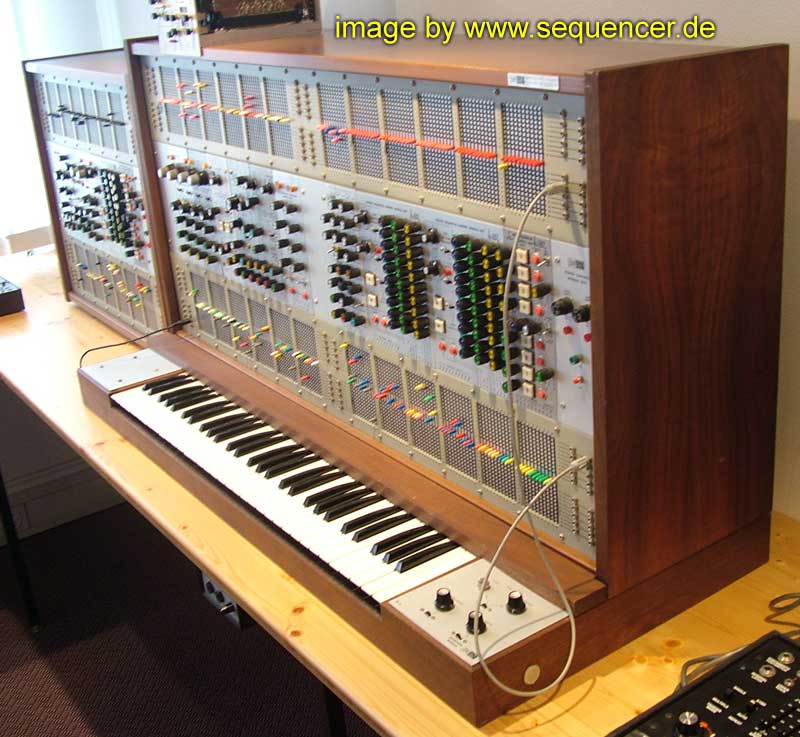
It's how a Arp 2500 works, that's a classical modular synth....
Joined: Oct 13, 2007 Posts: 6221 Location: near Austin, Tx, USA
Audio files: 270
Posted: Sat Mar 15, 2008 2:39 am Post subject:
Thanks for the history photo, Kassen. Well, good that you mention that because once I had the GUI started I decided to add some basic functionality for a group of four oscillators as shown below.
I also made the attached 11 second song of me manually sweeping an oscillator. There is something to that ability to gradually adjust parameters while hearing the sound that is appealing. Much better than editing a text file for parameters repeatedly when trying to get sounds out of something.
I think the controls are all obvious from the image. I have a lot more work to do before releasing the source code, but I'll get to that soon.
Oh, and by the way, the secret to the ChucKing and unChucKing mystery was to use a Gain block for each wire. That way outputs and inputs can all be adjusted separately as you move the sliders.
Synth_Lab_Test.mp3
Description:
Test of oscillator, manually sweeping SinOsc 0 from 0 to 1 kHz and back. It works!
Joined: Oct 13, 2007 Posts: 6221 Location: near Austin, Tx, USA
Audio files: 270
Posted: Sat Mar 15, 2008 3:10 am Post subject:
Just thought I'd throw in the attached recording which is not a manual sweep. It is two oscillators in a ring with fm synth modulation and different gains. Groovy man.
Joined: Oct 13, 2007 Posts: 6221 Location: near Austin, Tx, USA
Audio files: 270
Posted: Sat Mar 15, 2008 3:54 am Post subject:
Here is a fun sound I made on what is now called "Synth_Lab". I feel like it is at a good stopping point, so attached you'll also find the source code.
I am currently facing a language issue. I would like to ChucK and modify parameters and unChucK the various oscillators according to an integer variable. I have:
and I would like all references made when the variable is zero to go to the phasor, 1 to the sinosc, etc. Is there some way to use references or some other language feature to accomplish this? Otherwise I have to write a bunch of if statements all over the code, it would be quite messy.
Any suggestions?
Synth_Lab_Test3.mp3
Description:
short song of wacky oscillators.
Filesize:
186.94 KB
Viewed:
2307 Time(s)
Synth_Lab3.ck
Description:
First release of Synth Lab, has four oscillators plus record function.
Joined: Oct 13, 2007 Posts: 6221 Location: near Austin, Tx, USA
Audio files: 270
Posted: Mon Mar 17, 2008 2:49 am Post subject:
Oh right you are, kijjaz, it is fun to play with. I figured out a work-around for the ugen switching problem and put in the changes. This brings the work to a good stopping point, so I'm posting the source code for all to enjoy.
I find that having the node numbers on sliders is no real inconvenience, and ChucK keeps up with all the ChucKing and unChucKing with every slider move or ugen change. Note that you can change ugens by clicking on the button at the top of the slot. It will cycle through all of the related ugens. For example under oscillators each osc can be any of the six types of oscillator.
Also you can change the number of any ugen type at the very very top of the source code file, where it says:
Code:
10 => int num_nodes; // number of nodes available for connection
3 => int num_osc; // number of oscillators
3 => int num_filters; // number of filters
3 => int num_delays; // number of delay lines
I find that 10 nodes with 3 of each type is OK, but you may have other preferences. Aside from all of the above, the use of this application is fairly obvious. Please let me know if something doesn't work right or if you have a wish list for Synth Lab. I'll try to add features as time and motivation permit. Enjoy.
Synth_Lab7.ck
Description:
Synth Lab! For the analog experimenter in all of us...
Joined: Oct 13, 2007 Posts: 6221 Location: near Austin, Tx, USA
Audio files: 270
Posted: Mon Mar 17, 2008 5:18 am Post subject:
kijjaz wrote:
One thing that's not quite related to GUI part of this kind the project is that.. designing a modular synth in ChucK also means a tool that we can remodel or mess around without having to add new shred just to change the patch. So that we can have a running shred that we can ask it to chuck / unchuck / change send volumn while it is running by any kinds of control we can plug in.
As it turns out, kijjaz, that is accomplished by button and slider watching shreds. Every time the user interacts with the controls, one of the shreds activates and changes that parameter. The system therefore responds dynamically to user input, which is sweet indeed. You can hear blips and boops and wavy sounds as you adjust the controls. In this way you can sort of "play" it like an instrument.
By the way, it is not perfect, I'm finding that with all the node switching and stuff, sometimes the simulator goes silent and needs to be restarted. I am still doing test runs to try to identify the behavior so I can resolve the issue. If anyone notices such problems, would you post here about it? Thanks.
Joined: Oct 13, 2007 Posts: 6221 Location: near Austin, Tx, USA
Audio files: 270
Posted: Tue Mar 18, 2008 8:29 pm Post subject:
kijjaz wrote:
Wow! .. That's a very good-looking GUI! ..
It's gonna be one great tool to play with soon!
hmm it sounds cute ^_^"
Yes, I imagine that once you guys get MAUI powers you'll be making all kinds of cool GUIs. It's so easy to do and gives the user a variable control interface.
Right now I've added the gain modules and fixed some minor issues. I find that sometimes Synth Lab loses it's connections somehow, so for the moment I recommend restarting it whenever that happens. I'm not sure where the problem is and I want to try to fix it before releasing code again.
Joined: Oct 13, 2007 Posts: 6221 Location: near Austin, Tx, USA
Audio files: 270
Posted: Wed Mar 19, 2008 1:18 pm Post subject:
Here is another release of Synth Lab. It has several new features including the following.
Fixed bug where Synth Lab lost its connections. Although it appears to be more solid now, there are times after moving sliders and pressing buttons that I have to wait 20 or 30 seconds for Synth Lab to "catch up" and make the correct sound. Not sure why this is. For now, if Synth Lab gets lost, wait about 30 seconds.
Added self-destruct button to close all windows and end program, very handy since there are so many windows and you used to close them all manually.
Synth Lab ugens: Mic out, DAC stereo input, volume control, record function, gain-boosted nodes with .op(), gain blocks with boost and .op(), 6 oscillator types, five filter types, three delay types, three reverb types, noise source, and pitch shifter. Oh, and also parameterized arrays of ugens and parameterized slot width so you can size the Synth to meet your situation (screen size, CPU, slider sensitivity).
Now that I have many of ChucK's Synthesizer-like elements in place, I feel that Synth Lab needs a sequencer of some sort. Naturally, I would like to use a Boolean sequencer, but I'm still unclear of how to set up the inputs and outputs. I'll give it some thought. Any suggestions?
Now i'm thinking about programming a module that can receive notes from other sources in the computer..
hopefully by OSC.
so maybe we can send frequency value, velocity, gate on/off between shreds or between different programs..
so that you don't have to put everything in the SynthLab but instead make SynthLab ready to receive the data from any other sources.
Then we develop the other sources afterwards..
for example, some different kinds of sequencers and signal generator.
(and absolutely Boolean Sequencing Engine!)
and make it communicate with SynthLab through OSC.
Joined: Oct 13, 2007 Posts: 6221 Location: near Austin, Tx, USA
Audio files: 270
Posted: Wed Mar 19, 2008 7:20 pm Post subject:
kijjaz wrote:
Now i'm thinking about programming a module that can receive notes from other sources in the computer..
hopefully by OSC.
That sounds like a great idea, kijjaz. One thing is that I have been thinking of learning to play guitar and it would be nice to bring that into ChucK somehow. Other possibilities would be interfacing to a keyboard to create a classic synthesizer, or interfacing to other ChucK stuff. I'm sure you have a clearer picture of it than I do, so please continue to brainstorm about it as the ideas pop into your head.
I just created a kind of sequencer sort of in Synth Lab. It is really just a counter, composed of SqrOsc's passed thru HalfRect's, and each oscillator is half the frequency of the previous one, forming a binary count. I made the number of bits configurable and the number of counters configurable so users have the greatest degree of flexibility. The HalfRect's make the waveform of the counter outputs be either zero or one in value, so you can just feed them into a gain block and set .op(3) to get the multiplier which actually performs a NAND function due to the zero values. You can also add the bits with a .op(1) or subtract them with .op(2).
After NANDing some counter outputs, I modulate an oscillator on a 1,000 times gain boost of the NANDed signal to create a sine wave, and I adjust the gain of the gain blocks that perform the NANDing to get different frequencies for different output terms of the truth table. Finally a little reverb and a BPF give the SinOsc output some character.
This method of creating a sequencer is interesting because it does not require me to put any code in the time loop of the program, so the CPU is not burdened very much. In fact, unlike Guitar Lab which is up against CPU limitations on many machines, Synth Lab runs without quirks even when I have FireFox and iTunes running at the same time. I guess the STK instruments are complex and require a lot of CPU bandwidth.
Oh, I almost forgot. The attached audio file is 14 seconds of Synth Lab going beep-bop to the tune of the new counter-based sequencer.
I will post the code after I add some more features and play with it some more to test it for quirks. Stay tuned for more fun with Synth Lab!
Synth_Lab_Sequencer.mp3
Description:
boop ditty doo dah doo dit dit, a sequence created in Synth Lab with the new counter / sequencer thingie. 14 seconds long.
Joined: Oct 13, 2007 Posts: 6221 Location: near Austin, Tx, USA
Audio files: 270
Posted: Thu Mar 20, 2008 8:45 am Post subject:
This morning I put in a WahWah on the filters, but unfortunately had to spork shreds that cycle every 0.1::ms. There is some delay in the user interface due to this, but it's worth it to have WahWah. Maybe I can increase the time between cycles or something. Anyway, I made a little 14 second song of some underwater bubbling sounds, attached.
To create this sound I made a ring of three SinOsc's with frequency modulation, set their gains so they oscillated at low frequencies, then fed their output into the WahWah inputs of three BPF's. I set their Q's to 20 and then I connected three bits of the counter to the BPF inputs and sent the BPF outputs to the DAC. Oh, and to stimulate the oscillation I put a weak feedforward connection from the three counter bits to the three SinOsc's.
It made all sorts of weird sounds until I got it right. The trick was to increase the number of nodes and gains available so that I could let the oscillators run slow, but then multiply their outputs by 100 or so to drive the WahWah frequencies properly. I had to use 15 nodes and 8 gains, which is going up against the limit of the resolution of my screen.
Fortunately in a few hours of playing around, not once did Synth Lab lose it's connections so I think I have that bug fixed. I'm having a great time with this little project and I hope you are enjoying it too!
Synth_Lab_Underwater.mp3
Description:
Underwater bubbling sounds made with Synth Lab, 14 seconds long.
Joined: Oct 13, 2007 Posts: 6221 Location: near Austin, Tx, USA
Audio files: 270
Posted: Fri Mar 21, 2008 7:36 pm Post subject:
I can only guess as to what the problem might be without further information. Maybe you can try hooking a sinosc to the DAC node first and see if you can make a sinusoid sound.
Note: some of the gains are initialized at zero, maybe I should change that to 1 for new users? Also, you must hook up your output signal to the DAC or it will not get to the speakers.
You cannot post new topics in this forum You cannot reply to topics in this forum You cannot edit your posts in this forum You cannot delete your posts in this forum You cannot vote in polls in this forum You cannot attach files in this forum You can download files in this forum


 Forum index » DIY Hardware and Software » ChucK programming language


 FAQ
FAQ Calendar
 Search
 Memberlist
 Usergroups
 Register
 Profile
 Log in to check your private messages
 Log in
 Chat Room